How to Forward Voicemail to Email

Getting new voicemails used to be a pain. You had to dial a number, enter a PIN, and listen to a lot of steps just to hear a message. But what if you could forward voicemail to email and see everything in one place?
This simple change turns audio messages into files you can search and share. It makes them part of your daily work.
Why You Should Stop Checking Your Voicemail

Let's be honest: calling a voicemail box feels old. For a small business owner, a key customer message could be lost under other messages. For a busy person, finding a specific message from last week is almost impossible.
Learning to forward voicemail to email is a big deal. It moves you from an old system to a new one that really works for you.
The Problem with Old Voicemail
The number of calls makes the old system hard to use. Every day, about 13.5 billion phone calls are made around the world. A huge 80% of them go to voicemail. That is a lot of messages for people to check.
This is not just about making things easy—it is about being smart with your time. When voicemails come to your email, they are part of a system you already use all day. To learn more about modern communication, look into voicemail to text services. It can show you more ways to save time.
The real win is turning your voicemails into organized information you can use. Instead of a pile of audio files you have to hear one by one, you get a list you can search like any other email.
To see how big of a change this is, let's compare the old way with the new way.
Old Voicemail Problems vs. New Email Fixes
This table shows common problems with old voicemail and how sending them to email solves them.
| Common Voicemail Problem | How Email Forwarding Fixes It |
|---|---|
| Takes a Long Time to Check: You have to call, enter a PIN, and listen to prompts. | Check Right Away: Messages show up in your inbox. Just click to play. |
| No Easy Way to Search: To find one message, you have to listen to all of them. | Easy to Search: Search by name, date, or title to find what you need in seconds. |
| Hard to Share: You cannot easily send a voicemail to a coworker. | Simple Sharing: Forward the email with the audio file to anyone on your team. |
| No Saved Copy: Messages can be deleted by mistake or lost when a mailbox is full. | Saves Automatically: Voicemails are saved in your email, making a lasting, organized copy. |
| Not Organized: All messages are in one long, messy list. | Easy to Organize: Use email folders and labels to keep voicemails neat. |
In the end, making this switch puts you in charge.
Main Benefits of Email Forwarding
Moving your voicemails to your inbox gives you quick wins that make handling calls much easier. It is more than just getting an audio file in an email; it is about getting your time back.
Here is a quick list of what you get:
- Save Time: No more calling in and listening to steps. You see all your messages at once and can pick what is important.
- Stay Organized: Voicemails become easy to search and file. You can make a special folder to keep everything neat and find it on any device.
- Easy Sharing: Need to send a customer's message to your sales team? Just forward the email. This makes working together easy.
- Create a Record: Having a digital copy of your voicemails makes a lasting log of important calls. This is great for tracking what clients ask for or checking details later.
Set Up Voicemail-to-Email on Your Mobile Phone
Getting voicemails sent to your email from your phone is easier than you think. It does not matter if you use an iPhone or an Android phone. You can stop calling your voicemail box and start managing messages from your inbox. The exact steps can be a little different based on your phone and company, but the main idea is the same.
For most of us, the goal is to have one place for all messages, especially if you get business calls. If you want other ways to make handling calls easier, you can also learn how to redirect calls to mobile. This way, you never miss an important message, whether it is a voicemail or a live call.
How to Forward Voicemails on an iPhone
If you have an iPhone, you are in luck. The phone's Visual Voicemail feature makes saving and sharing your messages very simple. You do not need extra apps.
When you get a new voicemail, here is all you have to do:
- Open the Phone app and tap the Voicemail tab at the bottom right.
- Pick the voicemail message you want to save.
- Tap the Share icon (a small square with an arrow pointing up).
- From the choices that pop up, just pick your email app, like Mail or Gmail.
This puts the voicemail as an audio file in a new email. Type in your email address, hit send, and a copy will be in your inbox.
This way is great for saving single voicemails you cannot lose—like a detailed message from a top client or a confirmation number you need to look at later.
How to Forward Voicemails on an Android
With Android phones, things can be a bit different. Many companies make Android phones (like Samsung or Google). Also, phone companies (like Verizon or T-Mobile) have their own settings. So, the steps are not always the same. Still, you usually have a few good choices.
Most Android phones let you share from their Visual Voicemail app. You can usually tap a message, find a "Share" button, and then email the audio file to yourself.
If you do not see that choice, check your phone company's app or website. Big companies often have a setting you can just turn on.
- Verizon: Check "Voicemail Settings" in your My Verizon account. There is often a simple switch to send messages to your email.
- T-Mobile: In your My T-Mobile account, look for a "Voicemail to Email" setting.
- AT&T: This may be a feature you pay for called "Voicemail to Text/Email." You can turn it on in your account settings.
A quick search on your phone company’s help page will give you the newest instructions.
How to Get Business Voicemails Sent to Your Email
For a business, a missed call can mean a missed chance. That is why it is so important to set up a way to forward voicemail to email. It makes sure you never lose track of an important message or a new customer.
Good news: you do not need to be a tech expert to do this. Most modern business phone systems are made for this. Whether you use a new VoIP system or an older PBX, there is almost always a way to get your voicemails in your inbox.
Using VoIP and Cloud Phone Systems
If you use a Voice over Internet Protocol (VoIP) system, you are lucky. Voicemail-to-email is a normal feature on almost every platform. Over 3 billion people now use VoIP. This has made getting voicemails in email the new normal for businesses.
The time you save is a big deal. Studies show that VoIP features can save workers an average of 32 minutes a day. Also, 93% of companies say they work better after switching. You can see how much this technology helps by checking out more VoIP insights on electroiq.com.
Setting it up is usually quick in your provider's settings:
- First, log into your system’s admin page.
- Go to the settings for "Users" or "Extensions."
- Choose the user you want to set up.
- Look for a tab called "Voicemail" or "Notifications."
- Just turn on the option to "Send Voicemail to Email," enter the email address, and you are done.
This simple process works for most big VoIP companies. As soon as you save the settings, every new voicemail will show up in your inbox as an audio file.
This decision tree gives you a great picture of the different ways you can get your voicemails forwarded, for both personal and business lines.
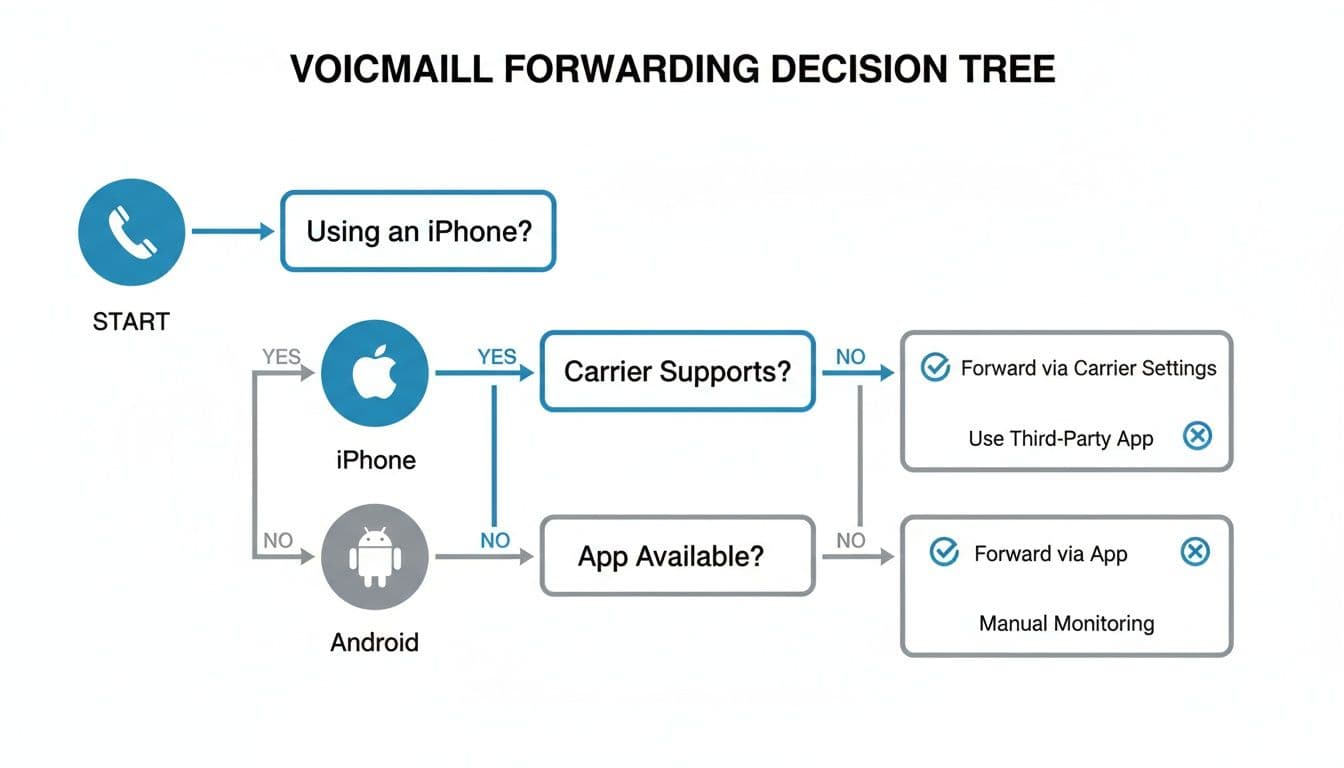
The main point here is that most new systems give you a few ways to do this, so you can pick what works best for you.
What About Old PBX Systems?
If your office still uses an old PBX (Private Branch Exchange) phone system, getting voicemails to your email takes more work, but you can still do it.
These older systems were not made for the internet, so they often need help. This usually means adding a special gateway—a piece of hardware or software. It connects your phone system to your email server. It is a job for an IT expert or your phone system company, but it gets the same result.
Google Voice for Small Businesses
For many small businesses and freelancers, Google Voice is a great tool. It is a free service that gives you a business number that rings on your personal phone. This keeps your work and private calls separate.
The best part? It turns voicemails into text and sends them right to your Gmail.
Setting up Google Voice is fast. Once you get a number, go to the settings, find the "Voicemail" part, and make sure "Get voicemail via email" is on. It is a very simple and strong tool for handling calls for free.
When you plan your business call system, it is smart to look at advanced call forwarding features to get more control over your calls. A good system is key. Knowing your choices is the first step to creating a professional business phone message and system that helps your business grow.
Comparing Business Phone Systems for Voicemail Forwarding
Choosing the right phone system can be hard. But for forwarding voicemail, some choices are much easier than others. This table breaks down the most common systems to help you pick the best one for your business.
| Phone System Type | How to Set Up Voicemail to Email | Best For |
|---|---|---|
| VoIP/Cloud Phone | Usually a simple switch in the admin settings under the user's page. | Businesses of all sizes that want new features and are easy to use. |
| Google Voice | A single checkbox in the voicemail settings to send messages to Gmail. | Freelancers and small businesses that need a free, simple tool. |
| Old PBX | Often needs a special gateway and help from an IT expert to connect the phone system to email. | Older businesses with existing hardware that are not ready to switch to a cloud system. |
The goal is the same for all: to have a good system for catching every message. A new VoIP system or a free tool like Google Voice will get you there the easiest way. A PBX system needs more technical work.
Organizing Voicemails in Your Inbox
Okay, so you have voicemails coming to your email. That is great. But if you are not careful, your inbox can get as messy as your old voicemail. Let's talk about how to keep things neat so you are really saving time, not just moving the mess.
You do not want an important client message lost under a bunch of ads and meeting notes. The key is to make a special place for your voicemails right inside your email.
Create a Special Voicemail Folder
Think of this as your voicemail center. In Gmail, you will want to make a "Label" for this. Something simple like "Voicemails" is perfect. If you use Outlook, you will set up a new "Folder" with the same name.
This one small change makes a big difference. It moves all your call messages out of your main inbox. This lets you check them all at once when you are ready.
Set Up Automatic Sorting Rules
Now for the magic part: making those voicemails sort themselves. You can set up a simple rule (or a "filter" in Gmail) that automatically sends these messages to their new home. You set it up once, and it works for you every day.
Here is how to do it:
- Look for a pattern. Most voicemail-to-email messages have something in common. It might be the same subject line, like "New Voicemail," or they always come from the same email address.
- Create your rule. Go into your email's settings and find the section for "Rules" or "Filters."
- Tell it what to look for. Set the rule based on the pattern you found—for example, "Subject has the words: New Voicemail."
- Tell it what to do. Set the action to "Move to" your new "Voicemails" folder.
This takes less than five minutes but saves you from moving messages by hand week after week.
Prioritize and Manage Voicemails for Your Team
When you work with a team, a missed voicemail can mean a missed chance. An unhappy customer or a new lead can be lost if no one follows up. This is where a shared, organized system is a must.
The key to good team communication is seeing what is going on. When everyone can see what calls have come in and who is handling them, nothing gets missed.
Think about sending important voicemails to a shared team email, like support@yourbusiness.com. Even better, you can often link this with your customer tracking system (CRM). This can create a task for someone automatically.
Using your email's built-in tools can also help. Ask your team to use flags or stars to mark urgent messages. This makes a clear sign so the most important calls get handled first and your customers stay happy.
Beyond Voicemail: A Smarter Way to Handle Missed Calls
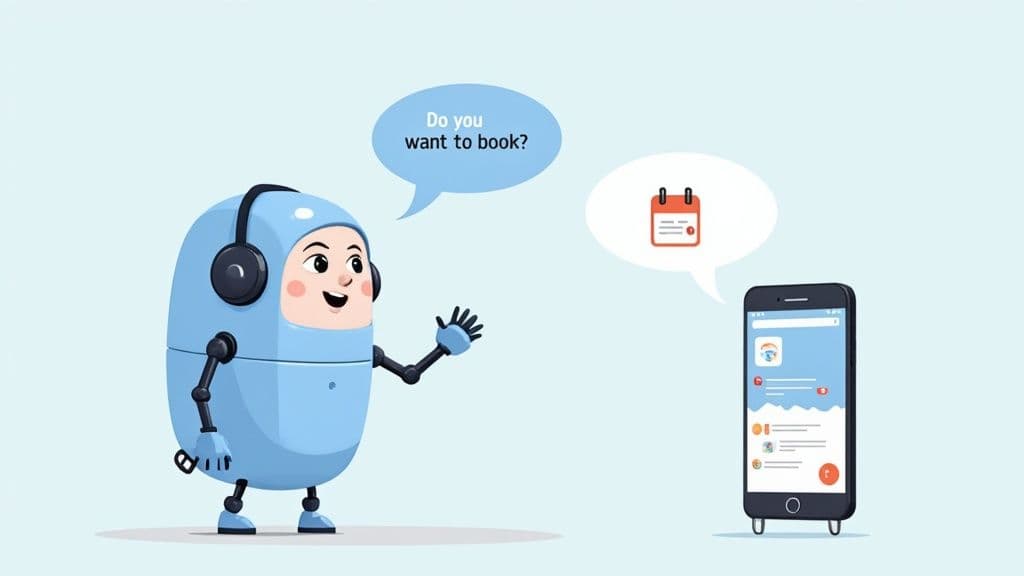
Getting your voicemails sent to email is a great way to save time. But what if you could avoid the whole problem of missed calls and playing phone tag?
Imagine your customers getting what they need right away, every time they call, even if you cannot answer. This is not a dream; it is what modern AI receptionists are doing for businesses right now. These tools do not just record messages—they talk with callers, solve problems, and turn a missed call into a good thing.
How an AI Receptionist Works
Instead of sending a caller to a voicemail box, an AI receptionist can greet them and find out what they need. It is a much better experience for the customer.
Let’s look at a common case for any service business: someone calls to book an appointment.
- The Old Way: They leave a voicemail. You listen to it, call them back, and hope they answer. You might play phone tag for a day or two before you book them.
- A Better Way: The AI receptionist answers and says, "Hi, thanks for calling! Do you want to book an appointment?" When the caller says yes, the AI texts them a link to your online calendar.
Just like that, the caller books their own appointment, and you did not have to do anything. This is a huge step up from just organizing voicemails. It is about making your phone a tool that works for you. A great automated phone answering service can really help.
Turning Missed Calls Into Good Things
This whole idea is about being there for your customers when they need you. Think about how many calls are for simple questions. A smart system can be set up to handle these questions right away.
It can instantly answer things like:
- "What are your business hours?"
- "How do I get to your office?"
- "Do you give free quotes?"
By giving answers right away, the AI frees you from being interrupted all the time. It also gives callers a good first feeling about your company.
The real magic here is turning something bad—a missed call—into something good that helps your business, 24/7.
Even with these tools, a surprising 35% of businesses still use old voicemail. But the move to better systems is making a big difference. New systems have a 67% user happiness rate because they work so well with daily tasks. One health group said their new system saved workers 45 minutes a day and made patients happier. You can learn more about the evolution of voicemail technology on clearlyip.com.
Who Gets the Most from This?
This kind of smart answering system is a lifesaver for service businesses where every call is a possible job. If you are a plumber, electrician, or cleaner, you know how bad it is to miss calls while you are on a job.
An AI receptionist makes sure that even when you are busy, new leads are saved and customers get help. It can check who is calling, send them the right info, and even book jobs for you. This helps you grow without being stuck on your phone.
Got Questions? We've Got Answers
When you start thinking about sending voicemails to your email, a few questions usually come up. Let's go through some of the most common ones.
How Good Are the Voicemail Text Copies?
Turning voicemails into text has gotten much better, but it is still not perfect. For clear, simple messages, most services are very good. You will understand the message with no problem.
But you should expect some mistakes. Things like strong accents, noise in the background, or special work words can confuse the software. This can lead to some funny or strange text. The best way to think of the text copy is as a quick look—it is perfect for checking if a message is important before you listen to the audio.
Is It Safe to Have Voicemails Sent to My Email?
This is a big question, especially if your calls have private client info. The short answer is that sending voicemails is as safe as your email itself. The audio file goes over the internet to your inbox. It is protected by the safety features of your email company, like Google or Microsoft.
But if you work in a field with strict rules like healthcare, you must make sure this meets those rules. At the very least, always use a strong password for your email and turn on two-factor authentication. It is a simple step that adds a very important layer of safety.
The main point is this: if you trust your email for other business messages, you can usually trust it for your voicemails. Just be smart about your account safety.
Will This Work With Any Phone or Company?
For the most part, yes. But how you set it up will be different depending on what you use.
- iPhone: Apple's built-in Visual Voicemail makes it super simple to share any message to your email.
- Android: You can usually do the same thing from your phone's voicemail app. Sometimes you might need to log into your phone company's website.
- Business Phone Systems: If you use a VoIP system, voicemail-to-email is almost always a normal feature you can just turn on in your account settings.
Some mobile phone companies might charge a few extra dollars a month for this feature. Others include it for free. The easiest way to find out is to go to your company’s website and check your plan.
Can I Forward Voicemails to a Team Member?
Yes—and this is where voicemail-to-email is great for businesses. As soon as that message is in your inbox as an audio file, it acts just like any other email attachment.
You can forward it to a coworker or a whole department with one click. This makes it very easy to keep everyone updated. It also makes sure customer questions get answered fast, even if the person they called is busy. It changes a voicemail from one person's task into a team task.
Ready to Never Miss a Call?
7 days. Cancel anytime.
Let Cira answer your calls and book jobs while you work.