How to Transfer a Call The Right Way: A Simple Guide
Have you ever tried to transfer a call and hung up by mistake? It happens. But learning how to transfer a call is a great skill. It makes your business look professional.
Why a Smooth Call Transfer Is So Important
Knowing how to transfer a call is more than just a tech skill. It's a key moment for your customer. A clean, easy handoff builds trust. It shows your business is organized.
On the other hand, a bad transfer can lead to dropped calls and unhappy customers. You might even lose business. A bad phone call can send a customer right to your competition. Getting this right is important for keeping customers happy.
How It Works in Real Life
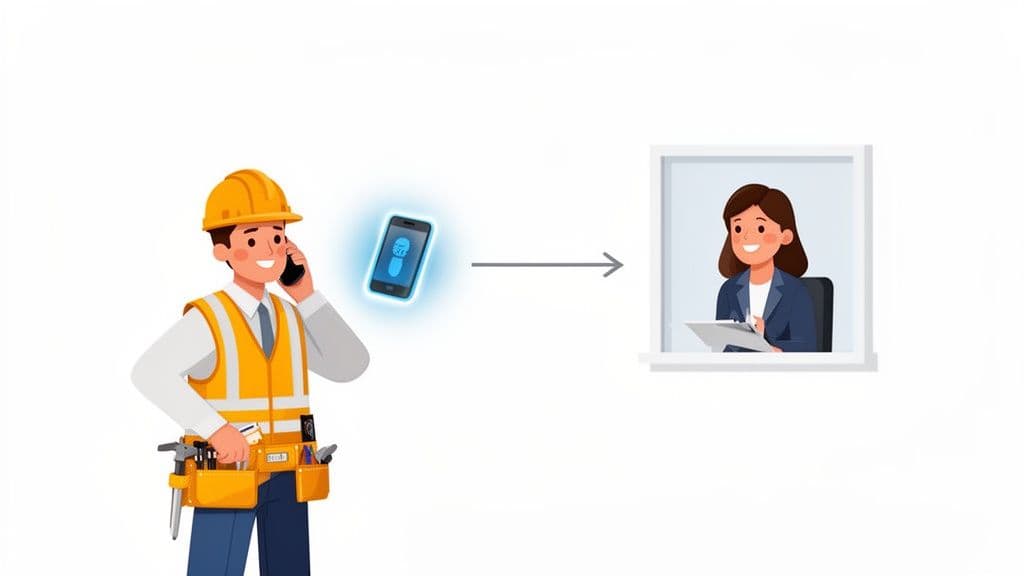
Think of a busy contractor on a job. A homeowner calls with a leaky roof and needs a price quote. The contractor can't look up prices. But Sarah in the office can. This is a very important moment.
A smooth transfer lets the contractor connect the homeowner to Sarah. Sarah can give a quote and book the job right away. That simple step turns a worried call into a new job.
If the transfer is messy, you could lose that customer for good. If the call drops or goes to voicemail, the homeowner will probably just call the next roofer on their list.
This shows that a call transfer is more than just pushing a button. It is linked to your sales. Every good handoff shows you run a great business that is ready to help.
Warm vs. Blind Transfers
When you pass a call to someone else, there are two ways to do it. The way you choose makes a big difference for the caller. It's like introducing people at a party. You can point them to the right person, or you can walk them over and say hello.
A warm transfer is like a personal introduction. You put the caller on hold, call your coworker, and tell them who is calling and why. Then you connect them. This makes it easy for the customer. They don't have to tell their story all over again.
A blind transfer is like pointing someone in the right direction. You send the call straight to your coworker’s line without talking to them first. It's fast and works well for simple requests.
When to Use Each Type
So, which one should you use? It depends on the call. A new customer with a big problem needs a warm transfer. To learn more, you can learn about the specific benefits of a warm transfer and see why customers like it.
A blind transfer is good for simple calls. Let's say a delivery person calls to check an address. A quick blind transfer to the right person is all you need. No introduction is needed.
Warm Transfer vs. Blind Transfer at a Glance
Here’s a quick chart to help you pick the right call transfer method.
| Situation | Best Method | Why It Works |
|---|---|---|
| A new customer needs a price quote | Warm Transfer | It feels personal and professional. It makes sure your coworker is ready to talk. |
| A caller wants a specific person | Blind Transfer | The request is simple and needs no extra information. It's the fastest way to connect them. |
| An upset client has a problem | Warm Transfer | This shows you care. You tell the support person about the problem before the handoff. |
| Someone calls to confirm a meeting | Blind Transfer | This is a simple task. The right person can handle it quickly without an introduction. |
Choosing the right way means understanding what the caller needs.
The main idea is: use a warm transfer for important talks and a blind transfer for simple ones. Taking a few extra seconds for a warm handoff can make a customer feel great and build trust.
How to Transfer a Call on Any Device
Knowing how to transfer a call is a basic skill. But the steps can be a little different on each phone. You might be on a cell phone, a desk phone, or a computer app. The main idea is always the same.
On any phone, look for a button that says "Add Call," "Conference," or "Transfer." These buttons let you bring another person into the call. The key is to get used to the steps so you can focus on the caller, not the phone.
This flowchart shows the difference between a warm transfer and a blind transfer. A warm transfer includes a quick talk before connecting the call.
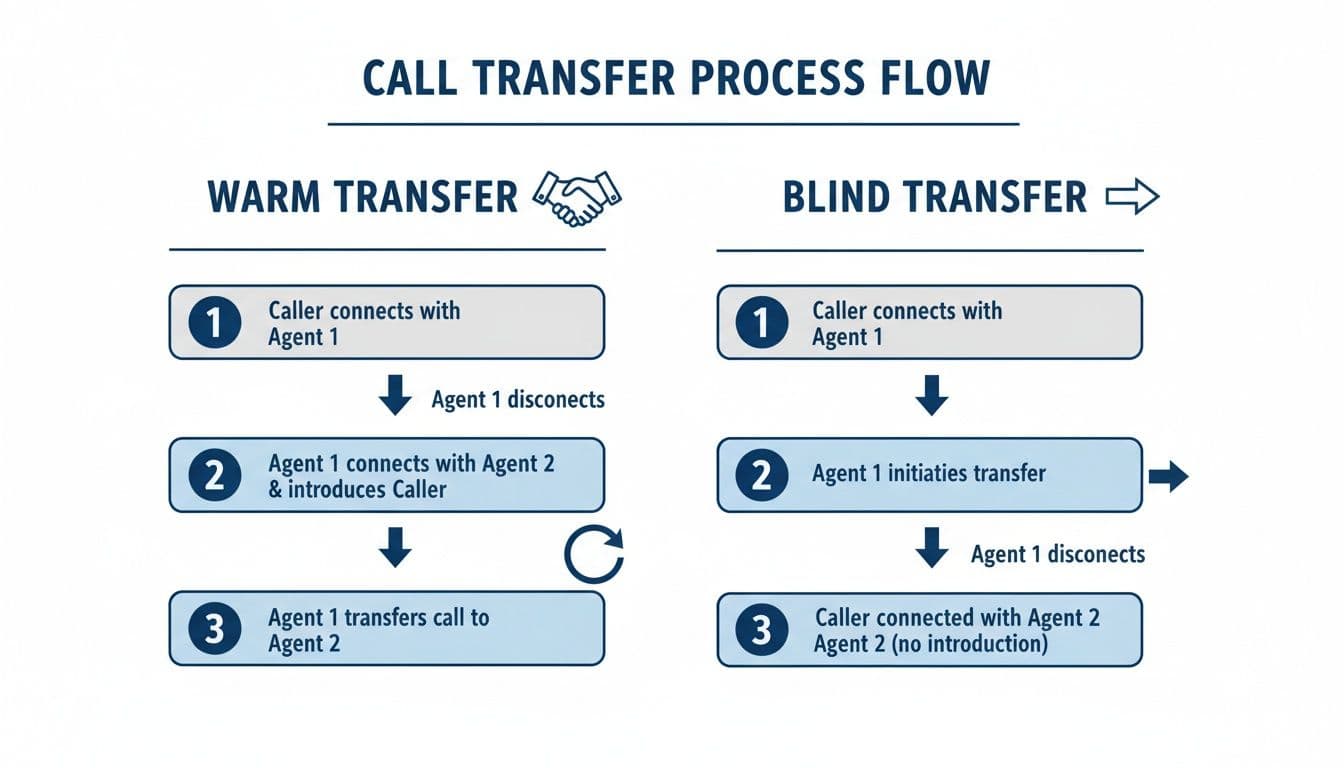
The big difference is that a warm transfer has a quick prep talk. This makes sure the person you are sending the call to is ready.
Transferring from a Mobile Phone (iPhone & Android)
It's pretty easy to transfer a call from your smartphone. This is very useful when you are out of the office and need to connect a customer with someone at your home base.
Here’s how it usually works:
- While on a call, tap the Add Call button. This puts the first caller on hold.
- Dial the number of the person you want to transfer to. Wait for them to answer.
- When they pick up, you can tell them who is calling and why. (This is the "warm" part of the transfer).
- Last, tap the Merge Calls or Conference button to connect everyone. On some phones, you can just hang up now, and the other two people will stay connected.
Using a Landline or Office Phone
Desk phones are great for managing calls. They are built for things like transfers. Most have a Transfer button, which makes it easy.
Just press the Transfer button while on a call. This usually puts the caller on hold. Then, dial your coworker’s extension or number. When they answer, you can announce the call. Then press the Transfer button again to finish.
Pro Tip: What if your coworker doesn't answer? Most office phones have a "Cancel" button. This lets you get back to the first caller without dropping them. This easy step saves you from sending a customer to an empty desk.
It's also good to know how to use other tools. For example, knowing how to record your Skype calls can be helpful for notes or training.
On a VoIP App or Softphone
With VoIP systems, your computer or phone app is your phone. The steps are like using a desk phone, but you do everything on your screen.
Look for a transfer button. It often looks like an arrow pointing to a phone. When you click it, you can type in your coworker's name or number. Most apps let you choose between a warm or blind transfer.
If you want to send calls to the right place from the start, you can check out different call forwarding options.
Getting the Handoff Right: What to Say
Knowing which buttons to press is only half the job. How you talk to the caller is also very important. Getting this part right makes the caller feel cared for.
A few simple words are all you need. You don't need a long script. Just let the caller know you found the right person to help them. This small step builds a lot of trust.
Simple Words for Smooth Transfers
You don’t need to overthink it. Be polite, clear, and quick.
Next time you transfer someone, try one of these lines:
- "Sarah is our expert on this. Can I put you on a short hold while I connect you?"
- "That's a great question for our scheduling team. I'll transfer you now."
- "Let me get you to John in billing. He can find that bill for you right away."
Each one is short and explains why you're transferring. There is no confusing language.
Call Transfer Manners: The Rules to Follow
Besides your words, good manners go a long way. Show respect for the caller's time and your coworker's time.
The golden rule? Always ask before putting someone on hold. A simple, "Is it okay if I put you on a brief hold?" makes a big difference. It shows you care about their time.
When you do a warm transfer, give your coworker a quick update. Just say, "I have David on the line about his price quote." This is enough to get them ready. Last, if you can, check that the transfer worked. These little things turn a simple task into great service.
Let Technology Handle Your Calls with Live Transfer
If you run a small business, you know every minute on the phone is a minute you aren’t working. An AI helper with Live Call Transfer can be your front desk. This way, you never miss a big opportunity.
Think about this: you're on a roof, and a new client calls about a big repair. Instead of the call going to voicemail, an AI helper like Cira answers right away. It learns the call is important. Then it transfers the call right to your cell phone.
What was a missed call is now a new job. The AI checks the call for you. So when your phone rings, you know it's a real customer ready to talk.
How Smart Transfers Help You
Using the right tech saves you time. It also makes your business look bigger and more professional. It makes sure every caller gets a quick, helpful answer, even when you can't pick up. That builds customer trust from the start.
For small businesses, these quick connections are very important. One study found that 71% of young adults still like a live call for quick answers, but the transfer must be smooth. Other research shows that warm transfers can solve problems on the first call 18% more often.
The bottom line: A smart transfer system turns missed calls into new jobs. It’s that simple. It catches new customers that you would have lost.
To get even more from your calls, you could use an automated caller software for sales teams.
This kind of tech works all the time, making sure your most important calls get to you. It's a great way to grow your business without hiring a full-time person to answer the phone. For more ideas, you might like our guide on a virtual answering service for small business.
What to Do When a Call Transfer Goes Wrong
We have all had a bad call transfer. You get dropped, sent to an empty desk, or stuck on hold. It's annoying. But these things happen. The real test is how you fix it.
The most common mistake? The dropped call. If you hang up by mistake, don't worry. Just call the person back right away. Say, "So sorry about that, we got cut off. Let me try to get you to Sarah again." This shows you are on top of it.
Another common mistake is sending someone to voicemail or to a phone with no one there. This usually happens with a blind transfer when you don't check if your coworker is free.
Quick Fixes for Common Transfer Problems
This is why a warm transfer is almost always better for important calls. That quick check to make sure your teammate is ready can save a lot of trouble.
Here’s how to fix a few other common mistakes:
- Sent to the Wrong Department? It happens. The best thing to do is admit it. Say you're sorry. "I'm sorry, it looks like I sent you to the wrong place. Let me get you to the right person this time." Then, do a careful warm transfer.
- Stuck on Hold Forever? If you are trying to transfer a call and your coworker isn't answering, don't leave the caller waiting. Get back on the line and give them choices. Offer to take a message or have the person call them back.
- The Technology Fails? Sometimes the "transfer" button just doesn't work. If your phone system has a problem, tell the caller what is happening. You can then offer another way, like giving them the direct number to call.
The secret is to stay calm and tell the person what's going on. Admitting the mistake and offering a fix shows you really care about helping them. That simple act can build trust, even when things go wrong.
Getting this right is important for your business. Bad transfers can make customers leave 16% more often. But a smooth, good transfer can make them 25% happier. Every call is a chance to do it right. You can see more facts on how call center performance impacts customers to see how much these details matter.
Your Top Call Transfer Questions, Answered
Even when you know the steps, a few questions always come up. Let's answer some of the most common ones so you're ready for anything.
Can I Transfer a Call Between Different Phone Types?
Yes, you can. You can transfer a call from your cell phone to a desk phone. Or from a computer app to a cell phone.
The phone system does the work for you, so you don't need to do anything special. Just follow the same transfer steps you normally would.
What If My Coworker Is Not There?
This happens all the time, especially with warm transfers. If you try to connect the caller and get voicemail, don't leave the caller waiting.
Get back on the line right away. Say something like, "It looks like Sarah is away from her desk. Would you like to leave a message, or can I try her assistant?" This simple step shows the customer you have not forgotten them.
Bad transfers are a big reason why businesses lose about 30% of calls that are on hold for more than two minutes. It's a bad experience for the customer.
New tools are helping with this. For example, a tool like Cira uses AI to help people manage transfers. It has lowered the number of dropped transfers from 25% down to just 2%. It makes a huge difference for customers. (Discover more insights about the international call services market)
Ready to Never Miss a Call?
7 days. Cancel anytime.
Let Cira answer your calls and book jobs while you work.